
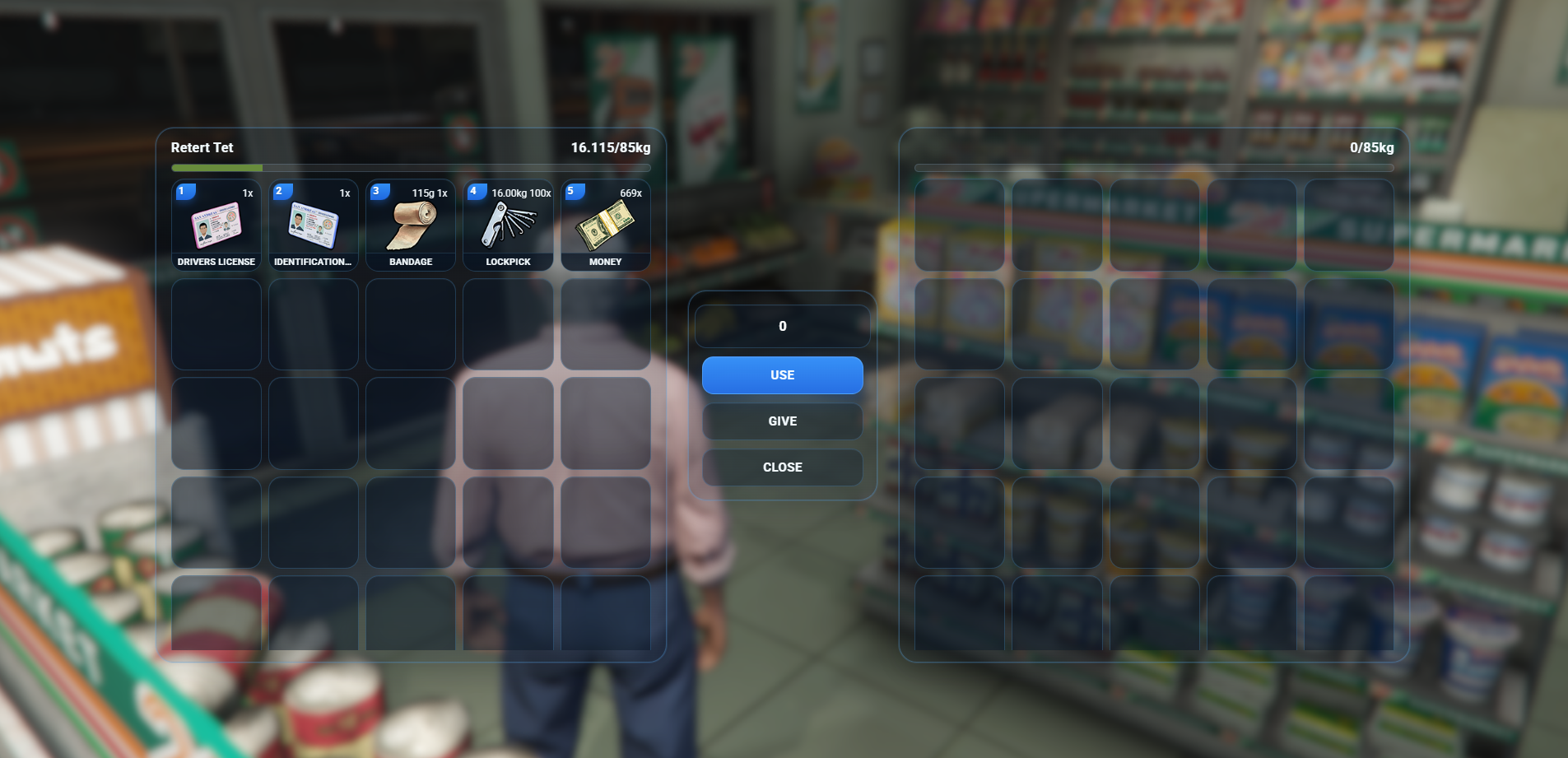
Give your ox_inventory a complete visual upgrade with the FishyScripts Modern Inventory UI.
This resource keeps the reliable functionality of ox_inventory, while replacing the default appearance with a cleaner, more modern and immersive design.
The UI features a dark transparent glass-style interface with blue accents, redesigned inventory slots, cleaner controls and a more premium FiveM roleplay look.
Features
- Modern redesigned OX Inventory UI
- Clean transparent / glass-style design
- No large black background overlay
- Modern blue FishyScripts theme
- Redesigned inventory slots
- Cleaner item labels
- Improved weight bar styling
- Redesigned Use / Give / Close controls
- Modern context menu
- Updated tooltips
- Improved hotbar styling
- Works with player inventories
- Works with vehicle trunks
- Works with stashes
- Works with shops
- Works with item metadata
- Keeps standard ox_inventory drag & drop functionality
- Lightweight UI modification
- No database changes required
- Easy installation
Requirements
- ox_inventory
- A working FiveM server using ox_inventory
This resource is a UI modification for ox_inventory. It does not replace the inventory backend, meaning your existing items, stashes, shops, metadata and inventory integrations can continue using ox_inventory.
Installation
1. Stop your server
Before installing the UI, stop your FiveM server.
2. Backup ox_inventory
Go to your current:
ox_inventory/web
Make a backup of the original web folder.
For example:
ox_inventory/web_backup
3. Replace the web folder
Download the FishyScripts Inventory UI and extract the files.
Inside the download you will find:
web
Replace the existing:
ox_inventory/web
with the FishyScripts web folder.
Your folder structure should look similar to:
ox_inventory
│
├── client.lua
├── server.lua
├── fxmanifest.lua
│
├── modules
│
└── web
    ├── build
    │   ├── assets
    │   └── index.html
    │
    └── images
4. Start your server
Start your server again or use:
restart ox_inventory
5. Clear FiveM cache if necessary
If the old inventory design still appears, restart FiveM and clear your client cache.
You can also completely restart the server after replacing the files.
Important
This package modifies the web/UI files of ox_inventory.
If you update ox_inventory in the future, the update may overwrite the custom UI. Always keep a backup of the FishyScripts UI before updating ox_inventory.
Delivery: You will receive the ZIP file by email after purchase. This resource is not downloaded through CFX.
Support
If you encounter an issue with the FishyScripts UI, please open a support ticket in the FishyScripts Discord.
FishyScripts — Clean scripts. Modern UI. Better roleplay.